

Steady.
A simple way to pause, reset, and regulate—right when you need it.
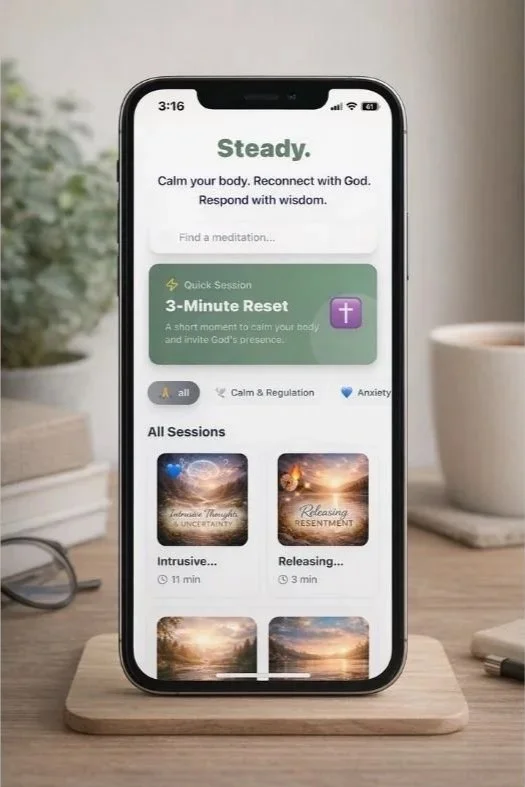
Steady is a web-based mindfulness and regulation app designed for real life. It offers short, guided practices—most just a few minutes long—to help you slow your body, settle your mind, and return to a sense of calm and clarity.
There’s nothing to download from an app store. Steady runs right in your browser and can be saved to your phone so it works just like a regular app.
You can use Steady directly from this link at any time. For the best experience, we recommend saving it to your phone’s home screen so it’s always one tap away.
Why Save Steady to Your Home Screen?
Most people don’t use mindfulness tools when they’re stressed because they’re hard to access in the moment.
Saving Steady to your home screen means:
No searching your browser
No remembering a URL
No friction when you need it most
It opens instantly and feels like a native app—because ease matters when your nervous system is already overloaded.
How to Add Steady to Your Home Screen
-
This works only in Safari on iPhone.
Open Safari
Go to app.balancedcc.com
Tap the Share icon (the square with the arrow)
Scroll down and tap Add to Home Screen
Tap Add
Steady will now appear on your home screen like any other app.
-
Open Chrome
Go to app.balancedcc.com
Tap the three-dot menu in the top-right corner
Tap Add to Home Screen
Confirm
Steady will open in its own app-style window.
A Final Word
Steady isn’t meant to replace deeper work like counseling, prayer, or community. It’s meant to support you in the in-between moments—when you notice stress rising, your thoughts speeding up, or your body holding tension.
Think of it as a place to return, again and again, to steadiness.